Authentication
This page explains the authentication process.
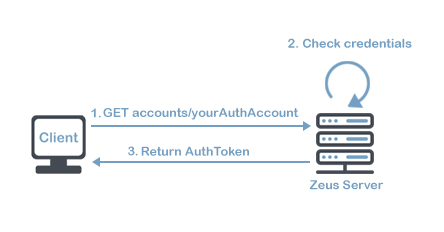
To obtain an authentication token that allows you to use the API, you have to follow this steps:
- Obtain your authaccount (encode to URL before using it) and authpass once logged on ZeusWeb, going to URL: api_credentials.html.
- Encrypt your user password using the authpass provided (view details). If the user has not a password, you must use "fJFYD42CMLEEKsUe" instead.
- Create the request (creating a request):
- yourAuthAccount: "authaccount" from api_credentials.html
- yourPasswordEncrypted: your ZeusWeb user password encrypted with AES-256-CBC using "authpass" provider in api_credentials.html
- Send the request to ZeusServer.
- ZeusServer respond with authentication token.
The provided token has a maximum time of use, after which it will expire and the authentication process in ZeusServer will have to be started again. This token must be used in each of the requests made to ZeusServer.
Utilities
You can also use our ZeusAPIDebugger tool, through which you can obtain an authentication token by entering your credentials and check that everything works correctly.
Download it here.