Creating a request
This page provides all necessary information to create requests and receive responses from the server.
Overview
ZeusAPI is an HTTP-based APIRest. It is not necessary to use SSL since the API uses its own encryption. However, ZeusAPI can also run on networks with SSL certificate.
The packages follow the HTTP 1.1 standard and it has the following structure:
- A Request-line
- Zero or more header fields followed by CRLF
- An empty line indicating the end of the header fields
- Optionally a message-body (payload) encrypted.
    POST /api/v1/messages/message?bySMS=FALSE HTTP/1.1
    User-Agent: ZeusClient APIRest
    Date: Fri, 10 May 2019 11:36:01 GMT
    Authorization: Bearer your-auth-token

    your-message-body
Headers
There is an important header:
- Authorization: Bearer (Required)
All requests (except to request your-auth-token) must have the header Authorization: Bearer your-auth-token. They are used for the control of permissions and the authentication of users. It is necessary to obtain an AuthToken before making any request to the server. This process is explained here.
Payload
The message-body (payload) contains the data that ZeusAPI and the clients exchange. These data are in JSON format and will be encrypted using AES-256-CBC. This payload can also be compressed using GZIP.

All information regarding data exchange and JSON format can be found here.
Encryption
The package body is encrypted using AES-256-CBC. There are two fundamental concepts in the encryption used:
- Encryption Key: the 256-byte AES key used for encryption (Base64). This key is the authpass that you get once logged on ZeusWeb in URL: api_credentials.html.
- Vector IV: is a 16-byte vector that adds randomness to the encryption so the same message will give different results depending on this vector. This vector is fundamental to be able to encrypt and decrypt the payload, and it is sent in the first 24 bytes of the payload (Base64).
To decrypt the payload (GET request):

To encrypt the payload (POST request):
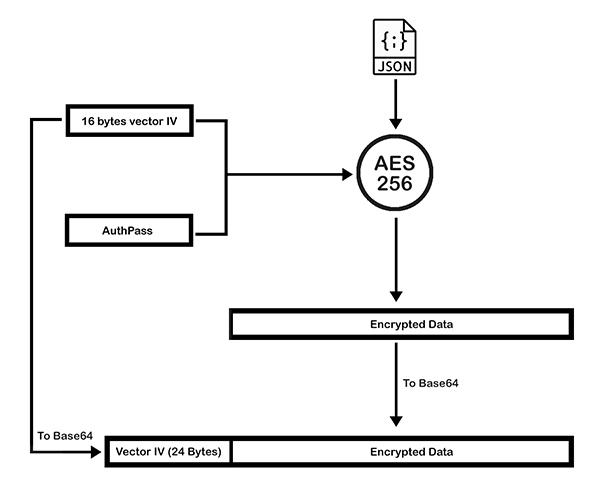
Compression
In case the payload is too heavy it can be compressed. For this, the AcceptEncoding and ContentEncoding filters are used. If in the request to the server we add the filter AcceptEncoding=gzip we are indicating that we want the response to send it to us compressed using GZIP (RF 1951). If we send a packet and we add the filter ContentEncoding=gzip is indicating that the payload data is compressed with GZIP (RF 1951).
It is important to note that the correct order to package the body of the package would be:
JSON -> Compress -> Base64(Compress) -> Encrypt
This compressed payload is encoded in Base64